
Imagine never having to type a single invoice, receipt, or purchase order into TallyPrime again. Instead, you simply upload a transaction document – a PDF, an image, or an email attachment – and within moments, a fully formed voucher appears in your books. That is exactly what Docs by Ira brings to the table.
Docs by Ira is a powerful TallyPrime plug-in that uses intelligent document processing to read transaction documents and automatically create vouchers. Whether you are a busy accountant, a small business owner, or a CA firm handling hundreds of client bills daily, this tool can save you hours of manual data entry while eliminating human errors.
In this comprehensive guide, we will cover everything you need to know about Docs by Ira in TallyPrime: what it is, prerequisites, how to check and load the plug‑in, providing consent, upgrading your plan, viewing your available balance, and answers to common questions. By the end, you will be ready to transform your accounting workflow.
What Is Docs by Ira in TallyPrime?
Docs by Ira is an official TallyPrime plug‑in (part of the Tally Ira services) that uses optical character recognition (OCR) and artificial intelligence to extract key information from transaction documents – such as vendor invoices, customer bills, receipts, or credit notes – and then creates corresponding vouchers in TallyPrime automatically.
Key capabilities:
- Supports various document formats (PDF, JPEG, PNG, etc.).
- Identifies fields like date, party name, amount, tax (GST), item details, and more.
- Creates sales, purchase, payment, receipt, and journal vouchers with a few clicks.
- Works seamlessly within your existing TallyPrime environment.
The plug‑in is designed to reduce manual data entry, improve accuracy, and speed up month‑end closing. It is especially valuable for businesses with high transaction volumes, such as retail, distribution, manufacturing, and professional services.
Prerequisites: Before You Start Using Docs by Ira
Before you can enjoy the benefits of Docs by Ira, you need to ensure your TallyPrime setup meets the following requirements – as outlined in the official documentation.
Prerequisite | Details |
Valid TallyPrime license | Your license must be active and not in educational mode. |
Active Tally Software Subscription (TSS) | An active subscription is mandatory for using plug‑ins like Docs by Ira. |
TallyPrime Release 7.0 or later | Older versions do not support the plug‑in. Upgrade if needed. |
A mobile number | Must be the same mobile number linked to your TallyPrime license (for OTP validation). |
A valid email address | You will receive registration OTP and communication on this email. |
Important: If your TallyPrime is running in Educational Mode, Docs by Ira will not work, even if you have registered for the plug‑in. You need a full commercial license with an active TSS.
How to Check Plug‑in Availability in TallyPrime
Once your license is ready and TSS is active, you need to verify that the Docs by Ira plug-in is properly loaded in TallyPrime. Follow these steps:
- Open TallyPrime.
- Update your license (ensure the latest license file is synced).
- Press F1 (Help).
- Select Tally Plug‑Ins from the menu.
- Look for Docs by Ira in the list. Its status should show as “Loaded”.
Below is a typical view you will see (simplified):
S. No. | Particulars | Status |
1 | Tally Ira ver. 3.0.0 Build 173 | Loaded |
2 | Docs by Ira | Loaded |
If the plug-in is not listed, try restarting TallyPrime, ensuring your internet connection is active, and checking that your TSS is current. If the problem persists, contact your Tally partner.
Providing Consent for Docs by Ira (One‑Time Setup)
For TallyPrime to be able to read your transaction documents and create vouchers, you must give explicit consent. This is a one‑time activity and is required due to data privacy and security regulations.
Step‑by‑Step Consent Process
- Initiate an import using Docs by Ira (e.g., try to import any transaction document).
- The User Agreement for Tally Ira Services screen appears. Fill in the following:
- View Terms & Conditions and Privacy Policy – Set to Yes and read the documents.
- Accept the terms and conditions by setting the option to Yes.
After you accept, the consent is recorded. From that moment on, you can freely import documents and create vouchers without repeating this step.
Creating Vouchers Using Draft Transactions Report
Once consent is given, you can create vouchers directly from the Draft Transactions report. Here is the typical workflow:
- Import a document – Drag and drop or browse to select a transaction document (invoice, bill, receipt).
- Docs by Ira reads the document – It extracts key fields like date, party name, amount, GST, etc.
- Review the draft voucher – TallyPrime shows a draft with the extracted data.
- Make corrections if needed – You can edit any field before finalising.
- Save as a voucher – Click “Create Voucher” and it is posted to your books.
This entire process takes seconds instead of minutes. And because the plug-in learns from corrections, it gets smarter over time.
Upgrading Your Docs by Ira Plan
When you first get the Docs by Ira plug‑in, you receive 100 pages of import free for a period of two months. A “page” typically means one side of a document (e.g., one invoice page). After you exhaust this free limit – or after two months – you need to upgrade to a paid plan.
How to Know Your Limit Is Exhausted
When you try to import a document and your free pages are used up, TallyPrime displays a message:
Your limit is exhausted. To continue using Docs by Ira, you can open the Tally Solutions portal and upgrade your plan now. Do you want to continue?
[Yes] [No]
Click Yes to proceed with the upgrade.
Step‑by‑Step Upgrade Process
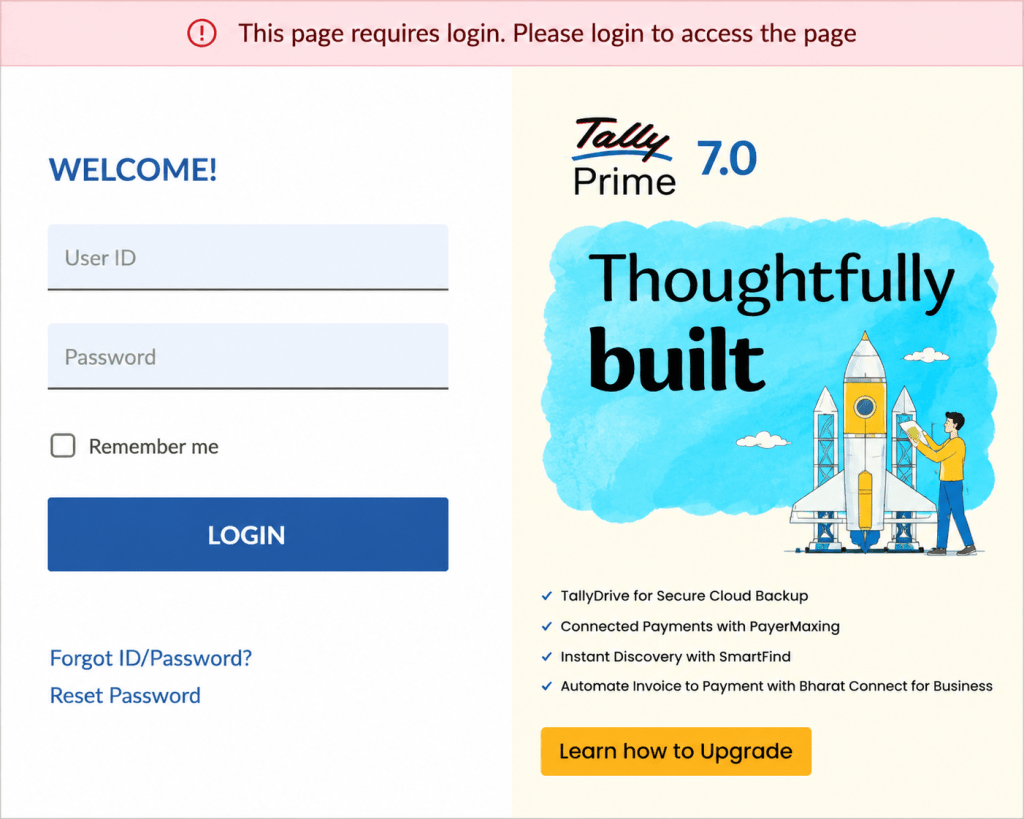
Step 1: Log in to the Tally Solutions Customer Portal
- Open https://tallysolutions.com/ (or the correct URL provided by Tally).
- Enter your registered Username and Password.
- Click LOGIN.
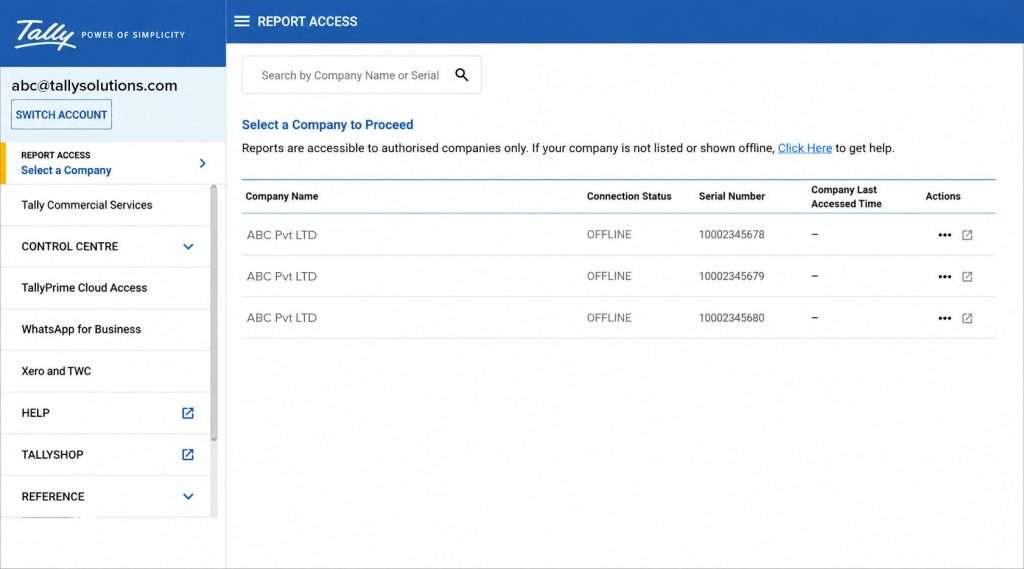
Step 2: Go to Tally Ira Services
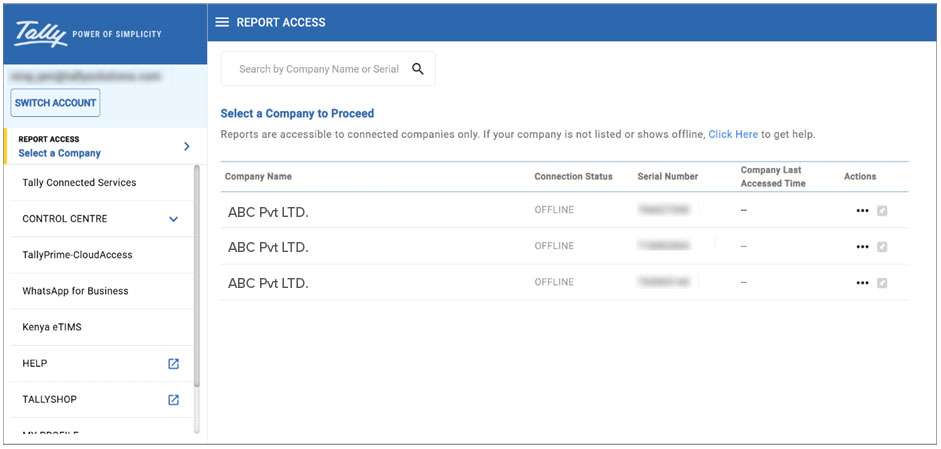
- Under Control Centre, click on Tally Ira Services.
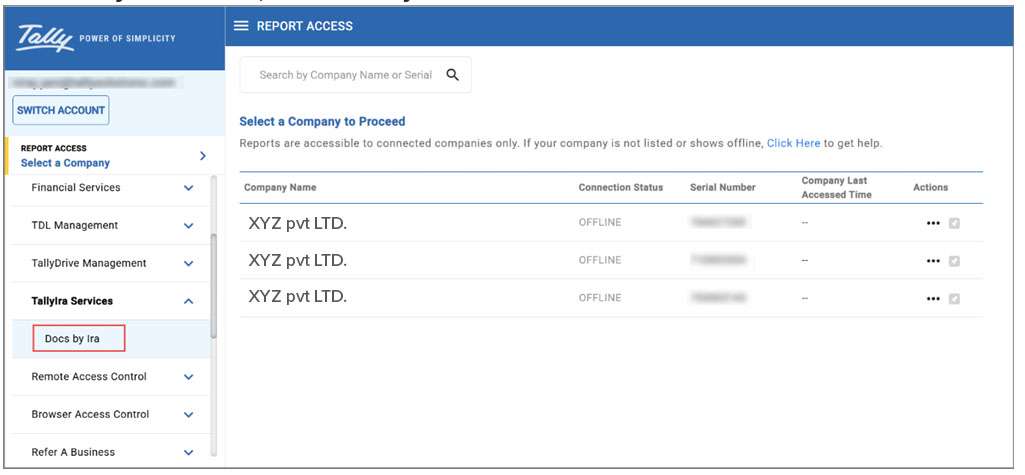
Step 3: Select Docs by Ira
- In the Tally Ira Services section, click on Docs by Ira.
Step 4: Choose the Relevant Serial Number
- You will see a list of your Ira service subscriptions. Click on the row with the Serial Number corresponding to your Docs by Ira plug‑in.
Step‑by‑Step Upgrade Process
Step 5: Click UPGRADE
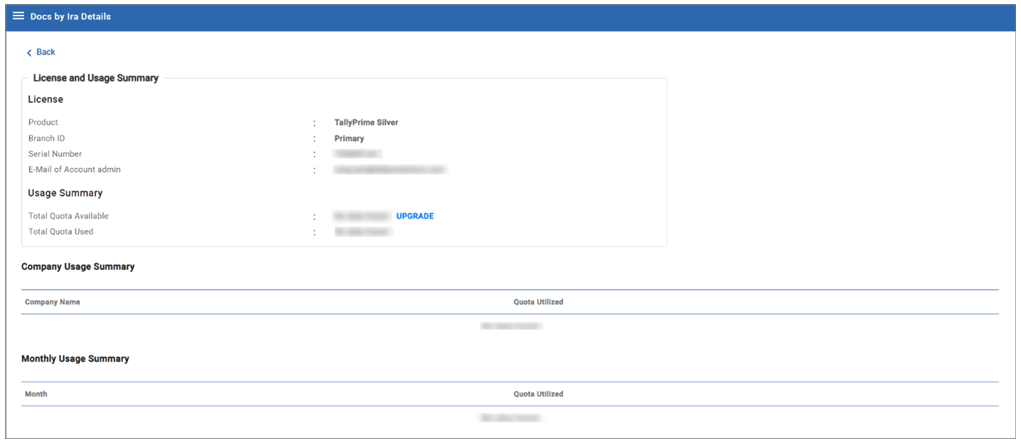
- On the details page, click the UPGRADE button.
Step 6: Specify Billing Details
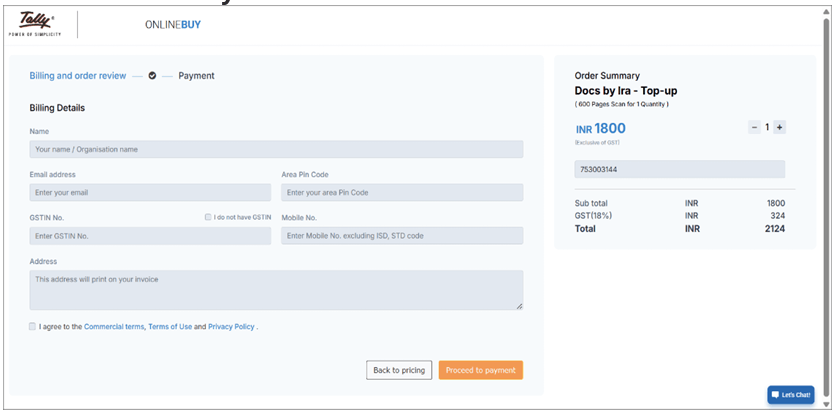
Fill in the following information accurately:
- Name – Your full name.
- Email address – A valid email (where you will receive invoices and receipts).
- Area Pin Code – Pin code of your company’s location.
- GSTIN No. – Your company’s GST identification number (if applicable).
- Mobile No. – Your mobile number.
- Address – Your company’s complete address.
Then, under Docs by Ira – Top‑up, use the + or – buttons to choose your desired plan (number of additional pages or a monthly subscription). Finally, click Proceed to Payment.
Step 7: Complete Payment
Follow the payment gateway instructions. Once payment is successful, the plug‑in is upgraded immediately, and your new page balance is available for use.
Pro Tip: If you frequently import documents, consider a higher‑volume plan to avoid frequent top‑ups. The cost per page typically decreases with larger plans.
Viewing Your Available Balance for Import
It is wise to periodically check how many pages you have left in your Docs by Ira plan, so you never run out unexpectedly. Here is how to view your balance.
Steps to View Balance
- Log in to the Tally Solutions customer portal (same as above).
- Under the Control Centre, click Tally Ira Services.
- Click on Docs by Ira.
- Click on the row with the relevant Serial Number for your plug‑in.
- On the details page, view two important figures:
- Total Quota Available – The total pages you have purchased (including any free initial pages and top‑ups).
- Total Quota Used – The number of pages you have already consumed.
The difference is your remaining balance. If the remaining balance is low, consider upgrading before you are interrupted during a critical import.
Benefits of Using Docs by Ira in TallyPrime
Beyond the obvious time savings, Docs by Ira delivers several concrete benefits for businesses and accounting professionals.
1. Drastic Reduction in Manual Data Entry
Entering a typical invoice with 10 line items takes 2–3 minutes manually. With Docs by Ira, the same task is done in 10–15 seconds. That is a 90% time saving. For a business processing 500 invoices a month, that translates to over 20 hours saved.
2. Fewer Human Errors
Typos in party names, GST amounts, or dates can lead to compliance issues and reconciliation headaches. Docs by Ira reads the document directly, so transcription errors are nearly eliminated.
3. Faster Month‑End Closing
When vouchers are created automatically, your books are updated in near real‑time. There is no backlog of unentered invoices. Month‑end closing becomes a matter of reviewing reports, not frantic data entry.
4. Improved Audit Trail
Every voucher created by Docs by Ira can be traced back to the original document. Auditors love this because they can easily verify the source.
5. Scalability Without Extra Headcount
As your business grows, transaction volume grows. With Docs by Ira, you can handle 2x or 3x the number of documents without hiring additional data entry staff.
6. Better GST Compliance
Because the plug-in extracts GSTIN, HSN codes, and tax amounts directly from vendor invoices, your GSTR‑1 and GSTR‑3B filings become more accurate, reducing the risk of notices and penalties.
7. Empowers Non‑Accounting Staff
Sales or purchase teams can upload documents directly into TallyPrime without knowing accounting entries. The plug‑in creates the correct voucher, and the accountant only needs to review.
Real‑World Use Cases
Use Case 1: Retail Chain with 20 Stores
Challenge: Each store sends hundreds of purchase invoices and sales bills daily. Manual entry requires 4 full‑time data entry operators.
Solution with Docs by Ira: Store managers upload scanned invoices directly into TallyPrime (or via email). Docs by Ira creates purchase and sales vouchers automatically. The 4 operators are redeployed to analysis and exception handling. Result: 60% reduction in data entry costs.
Use Case 2: Chartered Accountant with 50 Small Clients
Challenge: Each client sends messy PDFs of expenses, receipts, and bank statements. The CA’s team spends weekends keying in data.
Solution: The CA installs Docs by Ira for each client’s TallyPrime (or uses a hosted version). Clients upload documents to a shared folder. The plug‑in creates vouchers remotely. Result: Weekend work eliminated; client billing accuracy improved.
Use Case 3: Manufacturing Company with High Volume of Vendor Invoices
Challenge: 1,500 vendor invoices per month. Manual entry leads to late payments and missed discounts.
Solution: Docs by Ira imports every invoice on receipt. Purchase vouchers are created within minutes. The accounts team pays on time and avails early payment discounts. Result: Annual savings of ₹4 lakh from discounts and no late fees.
Best Practices for Using Docs by Ira
To get the most out of the plug‑in, follow these recommendations.
1. Ensure Document Quality
- Use clear, high‑contrast scans or photos.
- Avoid shadows, folds, or handwriting over printed text.
- PDFs created directly from software (e.g., e‑invoices) work best.
2. Standardise Your Document Formats
If possible, request vendors and customers to use a consistent invoice layout. Docs by Ira learns patterns, so consistency improves accuracy over time.
3. Review Draft Vouchers Before Saving
The plug‑in is highly accurate but not perfect. Always glance at the draft to verify key fields like date, party, and amount. Correct any mistakes – the plug‑in learns from your corrections.
4. Monitor Your Page Balance
Set a reminder to check your balance weekly or monthly. Do not wait until you run out in the middle of a busy day.
5. Keep TallyPrime and the Plug‑in Updated
Always update to the latest TallyPrime release and ensure the plug‑in is the latest version. Tally Solutions regularly improves OCR accuracy and adds features.
6. Train Your Team
Conduct a 30‑minute training session showing how to upload documents, review drafts, and save vouchers. This small investment pays back quickly.
Troubleshooting Common Issues
Even with a smooth tool, you may occasionally face issues. Here are solutions to the most common ones.
Issue | Likely Cause | Solution |
Docs by Ira not showing in Plug‑ins | TSS inactive or license not updated | Renew TSS and update license (F12 → Licensing → Update License). |
Consent screen appears every time | Consent not saved properly | Re‑enter Tally.NET ID and password, accept T&C again. |
Document import fails | Low‑quality image or unsupported format | Rescan at 300 DPI, save as PDF. Try a different file. |
Extracted data is wrong | Poor document layout or handwriting | Manually correct; plug‑in will learn. Consider standardising document templates. |
“Your limit is exhausted” message | Free pages used up or two months passed | Upgrade your plan via the customer portal. |
If you face any issues or need any assistance, feel free to get in touch with WebTakersIT. Our team will be happy to help you with complete support and guidance.
TallyPrime 7.1: New Features, Benefits, and Business Impact
No. You need an active commercial TallyPrime license with an active Tally Software Subscription (TSS) to use Docs by Ira or any Tally Ira service. Educational mode does not support plug‑ins.
You can use any email address for registration. Communications will be sent to that email. However, you must use the mobile number linked to your TallyPrime license, because the OTP received on that number validates your license and links the plug‑in to it.
Pricing depends on the plan you choose. Typically, plans start from a few hundred rupees per month for a basic page quota, with higher volumes costing less per page. Exact pricing is available on the Tally Solutions customer portal when you upgrade.
Yes. The plug‑in supports both purchase invoices (vendor bills) and sales invoices (customer bills). It can also create payment, receipt, and journal vouchers depending on the document type.
Currently, Docs by Ira processes one document at a time. However, you can queue multiple imports, and each will create a separate draft voucher.
Yes. The plug‑in supports both purchase invoices (vendor bills) and sales invoices (customer bills). It can also create payment, receipt, and journal vouchers depending on the document type.